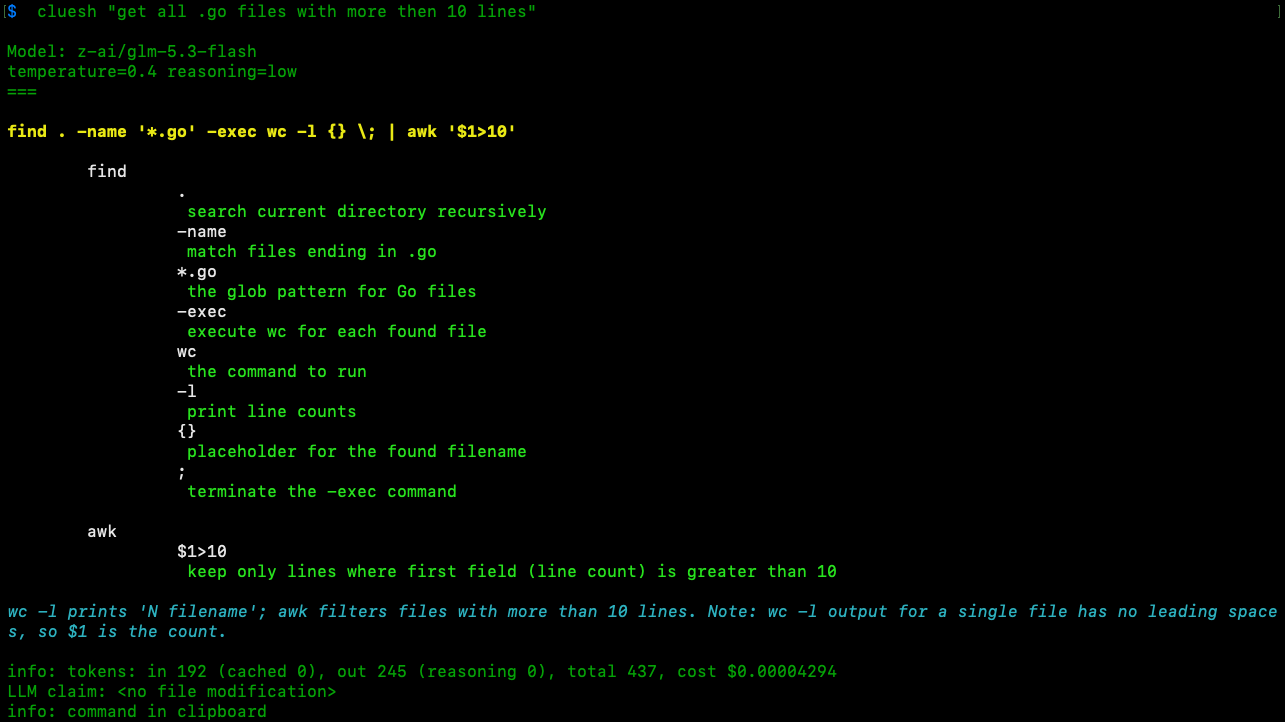
You do not need a 200-flag agent to run one command. cluesh sends your request to a cheap LLM through OpenRouter, OpenAI, or LM Studio. It prints the final one-liner and a structured explanation of each subcommand, flag, and argument.
cluesh never executes the command. Its only side effect is copying the result to your clipboard.
cluesh in dark mode
The generated command, its flag-by-flag explanation, token usage, and clipboard status.
i.
One command.
The output is a single command you can inspect and paste into your shell.
ii.
Every part explained.
cluesh breaks down subcommands, flags, arguments, and caveats.
iii.
Your choice of model.
Use OpenRouter, OpenAI, or a local LM Studio endpoint.
First run · Install
Install cluesh and check your path.
Start by checking where Go installs command-line programs. Make sure that directory is included in your shell's PATH.
Go binary directory
$  go env | grep GOBIN
GOBIN='~/go/bin'
Install the latest release
$ go install github.com/dbedla/cluesh/cmd/cluesh@latest
Confirm cluesh is available
$  which cluesh
~/go/bin/cluesh
Run cluesh without a demand once. It creates the default configuration and tells you what to configure next.
Create the default configuration
$  cluesh
created ~/.cluesh/config.json
created ~/.cluesh/sysprompt.md
created ~/.cluesh/providers/openrouter.json
created ~/.cluesh/providers/openai.json
created ~/.cluesh/providers/lmstudio.json

First run: default configuration created. Finish configuration:
  - set your API key in a provider file, e.g. providers/openrouter.json:
      "api_key_env": "OPENROUTER_API_KEY"
  - review config.json and pick your default model (default_model_tag)
Then run: cluesh "<demand>"
Details: cluesh --help / https://github.com/dbedla/cluesh/blob/main/README.md
config.json controls the default model, colors, clipboard behavior, and timeout. Each file under providers/ defines credentials and models for one provider. sysprompt.md contains the cluesh system prompt.
First run · Configure
Choose a model and provide a key.
The main configuration selects a model tag and controls terminal output. Set default_model_tag to a tag defined in any provider file. You can override it for one request with --llm.
A provider can read its key from an environment variable or from api_key. When both are configured, api_key_env wins. Model tags must be unique across all provider files.
Send cluesh a natural-language demand. It prints the selected model, the generated command, an explanation of every part, relevant caveats, token usage, and clipboard status. It does not execute the command.
First OpenRouter request
$  cluesh "list all files and present output in order of creation date"

Model: z-ai/glm-5.3-flash
temperature=0.4 reasoning=low
=======

ls -lt --time=birth

    ls
         -l
          use long listing format
         -t
          sort by time, newest first
         --time=birth
          sort by file creation time (birth time)

On systems/filesystems without birth time support, use 'ls -lt' (modification time) instead: ls -lt --time=birth || ls -lt

info: tokens: in 192 (cached 0), out 112 (reasoning 0), total 304, cost $0.00008480
LLM claim: <no file modification>
info: command in clipboard
After the first successful request, cluesh stores the conversation in conversation.jsonl.
A normal run starts a new conversation and replaces this file. Pass -c or --continue to load the previous context and append the next exchange.
Continue the previous request
$  cluesh -c "revers order"

Model: z-ai/glm-5.3-flash
temperature=0.4 reasoning=low
==

ls -lrt --time=birth

    ls
         -l
          use long listing format
         -t
          sort by time, newest first
         -r
          reverse the sort order (oldest first)
         --time=birth
          sort by file creation time (birth time)

On systems/filesystems without birth time support, use 'ls -lrt' (modification time) instead: ls -lrt --time=birth || ls -lrt

info: tokens: in 307 (cached 0), out 135 (reasoning 8), total 442, cost $0.00003272
LLM claim: <no file modification>
info: command in clipboard